
video/broadcast embedded object
The HbbTV video/broadcast embedded object enables HbbTV applications to interact with and control the underlying broadcast and video playback capabilities of a connected TV device. It provides a standardized interface to access linear broadcast content, manage media playback, retrieve metadata, and control trick-play functions where permitted.
Key capabilities include:
- Tuning to broadcast channels via channel objects and channel lists
- Retrieving EPG data (Electronic Programme Guide) and programme metadata
- Controlling playback (e.g. play, pause, stop) for broadcast and AV content
- Listening for broadcast events such as channel changes and signal loss
- Accessing media components, such as video, audio, and subtitles
The object adheres to the OIPF (Open IPTV Forum) specification, as adopted and extended by the HbbTV standard. While it supports a wide range of use cases across different device types, actual implementation details may vary by HbbTV version and manufacturer.
States
The state diagram below shows the states that a video/broadcast object may be in. Dashed lines indicate automatic transitions between states. The video/broadcast object will be in the unrealized state when it is instantiated.
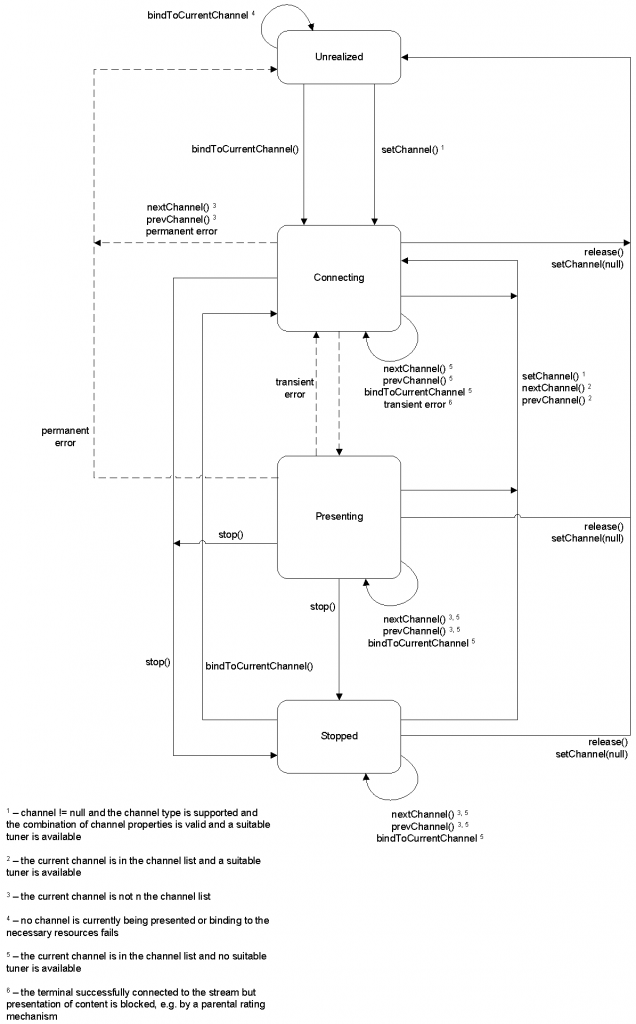
Figure: State diagram for embedded video/broadcast objects
Transient errors are defined as ones that that the terminal will automatically recover from without intervention by an application. Transient errors persist until either the condition which caused them is corrected or it is determined that it cannot be connected and the error becomes permanent. Permanent errors are defined as ones that the terminal will not automatically attempt to recover from.
The state changes of a video/broadcast object and the conditions for them are detailed in the table below.
| Old State | Trigger | New State | State Transition Events | Description |
|---|---|---|---|---|
| All states | setChannel(channel) where channel != null and the channel type is supported and the combination of channel properties is valid and a suitable tuner is available | Connecting | PlayStateChange | The terminal attempts to connect to the requested channel. The currentChannel object reflects the channel being changed to. |
| All states | setChannel(channel) where channel != null but either the channel type is not supported or the combination of channel properties is invalid or a suitable tuner is not available | No change | ChannelChangeError | The terminal remains in the same state. |
| Connecting or Presenting or Stopped | nextChannel(), prevChannel() where the video/broadcast object currentChannel is in the channel list and a suitable tuner is available | Connecting | PlayStateChange | The terminal attempts to connect to the requested channel. The currentChannel object reflects the channel being changed to. |
| Connecting | nextChannel(), prevChannel() where the video/broadcast object currentChannel is not in the channel list | Unrealized | ChannelChangeError PlayStateChange | |
| Presenting or Stopped | nextChannel(), prevChannel() where the video/broadcast object currentChannel is not in the channel list | No change | ChannelChangeError | The terminal remains in the same state. |
| Connecting or Presenting or Stopped | nextChannel(), prevChannel() where the video/broadcast object currentChannel is in the channel list but no suitable tuner is available | No change | ChannelChangeError | The terminal remains in the same state. |
| Unrealized | bindToCurrentChannel() when at least one channel is currently being presented by the terminal and binding to the necessary resources does not fail | Presenting | PlayStateChange | The terminal binds the video/broadcast object to the current channel being natively presented. The currentChannel object reflects the channel being presented. |
| Unrealized | bindToCurrentChannel() when there is no channel currently being presented or binding to the necessary resources to play the channel through the video/broadcast object fails | Unrealized | PlayStateChange | The terminal continues to present the current channel, if any. |
| Connecting | The terminal successfully connected to the broadcast or IP multicast stream and presented its contents. | Presenting | ChannelChangeSucceeded PlayStateChange | This transition occurs automatically when media presentation starts. |
| Connecting | The terminal successfully connected to the broadcast or IP multicast stream but presentation of content is blocked, e.g. by a parental rating mechanism, content protection mechanism or resources cannot be claimed that are currently in use for presenting broadband content | Connecting | ChannelChangeSucceeded PlayStateChange | This is conceptually equivalent to a successful channel change where a transient error immediately pre-empts media presentation without the video/broadcast object entering the presenting state. |
| Connecting | Recovery from a transient error, including – presentation of content no longer being blocked by a content protection mechanism (e.g. the start of a free preview period or a channel that changes from being encrypted to being in the clear during the day) | |||
| – the end-user entering a PIN code or other equivalent authorization to enable access to content protected by parental access control | ||||
| – resumption of delivery of media data | Presenting | PlayStateChange | If a video/broadcast object was forced from the presenting state to the connecting state due to a transient error and that error condition clears while the video/broadcast object remains in the connecting state then the video/broadcast object will automatically transition back to the presenting state. | |
| Connecting or Presenting or Stopped | release() or setChannel(null) | Unrealized | PlayStateChange | The control is returned to the terminal. The currentChannel object is set to null. If an application has modified the set of components being presented (e.g. changing the audio or subtitle stream being presented) then the same set of components will continue to be presented. |
| Connecting | Permanent error including | |||
| – failure to change to a new channel (e.g. the channel cannot be found or none of the media components can be decoded or insufficient resources are available to present the channel) | ||||
| – exhaustion of all possibilities for an end-user to authorize access to content protected by a parental access control mechanism (e.g. timeout on a PIN entry dialogue or the terminal not providing the ability to authorize access) | ||||
| – delivery of media data was interrupted and has not resumed after an implementation-dependent timeout | Unrealized | ChannelChangeError PlayStateChange | The terminal encountered a permanent error | |
| Connecting or Presenting | stop() | Stopped | PlayStateChange | |
| Presenting | Transient error including – presentation of content being blocked by a content protection mechanism, | |||
| – presentation of content being blocked by a parental rating mechanism, | ||||
| – interruption of delivery of media data (either via IP or hybrid) if either; |
a) the media data is delivered over a connection and the connection remains intact or
b) the media data is delivered via a connectionless mechanism | Connecting | PlayStateChange | The terminal encountered a transient error. During media presentation, transient errors (e.g. transient errors in the bitstream, temporary loss of signal or temporary halting of media decoding due to parental control issues) may cause the object to transition from the presenting state to the connecting state. Temporary loss of resources due to presentation being interrupted by playback of audio from memory may cause the object to transition from the presenting state to the connecting state. |
| Presenting or Stopped | Permanent error including;
– interruption of delivery of media data where the media data is delivered over a connection and the connection terminates | Unrealized | PlayStateChange | The terminal encountered a permanent error. |
| Stopped | bindToCurrentChannel() | Connecting | PlayStateChange | The terminal starts to present the current channel. |
| Stopped | bindToCurrentChannel when suitable video and audio decoders are not available | Stopped | PlayStateChange | |
| All states | Destroy video/broadcast | N/A | | When a video/broadcast object is destroyed (e.g. by the video/broadcast object being garbage collected) control of broadcast video will be returned to the terminal. If an application has modified the set of components being presented (e.g. changing the audio or subtitle stream being presented) then the same set of components will continue to be presented. When a video/broadcast object is destroyed due to a page transition within an application, terminals may delay this operation until the new page is fully loaded in order to avoid display glitches if a video/broadcast object is also present in the new page. Presentation of broadcast video or audio will not be interrupted in either case. |
If the current channel is requested to be changed due to an action outside the application (for example, the user pressing the CH+ key on the remote) then any video/broadcast object bound to that channel (i.e. in the connecting, presenting or stopped states as the result of a call to bindToCurrentChannel()) will perform the same state transitions and dispatch the same events as if the channel change operation was initiated by the application using the setChannel() method.
Applications can use the playState property of the video/broadcast object to read its current state.
When a video/broadcast object stops being rendered as defined in section 10.1 of the HTML5 specification a terminal may release scarce resources allocated for that object. Vice versa, a video/broadcast object which is not visible but it’s still being rendered will still be decoding video if it is in the presenting state and any audio associated with the currently presented channel will still be audible. State transitions caused by calls to methods on the video/broadcast object, or due to permanent or transient errors, will occur as shown above regardless of the visibility of the object
NOTE: as implied above, rendering state and visibility are not equivalent. This implies, just to give two examples, that display:none will affect the object state while visibility:hidden will not.
Constants
The following constants are defined as properties on video/broadcast objects:
| Name | Value | Use |
|---|---|---|
| COMPONENT_TYPE_VIDEO | 0 | Represents a video component. This constant is used for all video components regardless of encoding. |
| COMPONENT_TYPE_AUDIO | 1 | Represents an audio component. This constant is used for all audio components regardless of encoding. |
| COMPONENT_TYPE_SUBTITLE | 2 | Represents a subtitle component. This constant is used for all subtitle components regardless of subtitle format. NOTE: A subtitle component may also be related to closed captioning as part of a video stream. |
Properties
This section details the properties of a video/broadcast object.
| Integer width |
The width of the area used for rendering the video object. This property is only writable if property fullScreen has value false.Changing the width property corresponds to changing the width property through the HTMLObjectElement interface, it also has the same effect as changing the width through the DOM Level 2 Style interfaces (i.e. CSS2Properties interface style.width), for values specified in pixels. |
| Integer height |
The height of the area used for rendering the video object. This property is only writable if property fullScreen has value false.Changing the height property corresponds to changing the height property through the HTMLObjectElement interface, it also has the same effect as changing the height through the DOM Level 2 Style interfaces (i.e. CSS2Properties interface style.height), for values specified in pixels. |
| readonly Boolean fullScreen |
| Returns true if this video object is in full-screen mode, false otherwise. The default value is false. |
| String data |
| Setting the value of the data property has no effect on the video/broadcast object. If this property is read, the value returned is an empty string. |
| readonly Integer playState |
| The current play state of the video/broadcast object. Valid values are given in the table below. |
| Value | Description |
|---|---|
| 0 | unrealized; the application has not made a request to start presenting a channel or has stopped presenting a channel and released any resources. The content of the video/broadcast object should be transparent but if not it will be an opaque black rectangle. Control of media presentation is under the control of the terminal, as defined in the additional notes section on interaction with video/broadcast object below. |
| 1 | connecting; the terminal is connecting to the media source in order to begin playback. Objects in this state may be buffering data in order to start playback. Control of media presentation is under the control of the application, as defined in the additional notes section on interaction with video/broadcast object below. The content of the video/broadcast object is implementation dependent. |
| 2 | presenting; the media is currently being presented to the user. The object is in this state regardless of whether the media is playing at normal speed, paused, or playing in a trick mode (e.g. at a speed other than normal speed). Control of media presentation is under the control of the application, as defined in the additional notes section on interaction with video/broadcast object below. The video/broadcast object contains the video being presented. |
| 3 | stopped; the terminal is not presenting media, either inside the video/broadcast object or in the logical video plane. The logical video plane is disabled. The content of the video/broadcast object will be an opaque black rectangle. Control of media presentation is under the control of the application, as defined in the additional notes section on interaction with video/broadcast object below. |
NOTE: Implementations where the content of the video/broadcast object is transparent in the unrealized state give a better user experience than ones where it is black. This happens for an application with video in the background between when it includes a video/broadcast object in the page and when a call to bindToCurrentChannel() completes. Applications which do not need to call bindToCurrentChannel() should not do so. The current channel can be obtained from the currentChannel property on the ApplicationPrivateData object which is the same as that on the video/broadcast object under most normal conditions.
| function onPlayStateChange( Number state, Number error ) |
The function that is called when the play state of the video/broadcast object changes as defined in the video/broadcast object state table, including changes from a state back to the same state. This function may be called either in response to an action initiated by the application, an action initiated by the terminal or by an error. In some cases, as detailed in the state table, ChannelChangeError will be called instead of this function.The specified function is called with the arguments state and error. These arguments are defined as follows: Number state – the new state of the video/broadcast object. Valid values are given in the definition of the playState property above. Number error – if the state has changed due to an error, this field contains an error code detailing the type of error. See the definition of onChannelChangeError above for valid values. If no error has occurred, this argument takes the value undefined. |
| function onFullScreenChange() |
| The function that is called when the value of fullScreen changes. |
| function onfocus() |
| The function that is called when the video object gains focus. |
| function onblur() |
| The function that is called when the video object loses focus. |
| readonly Channel currentChannel |
| The channel currently being presented by this embedded object if the user has given permission to share this information, possibly through a mechanism outside the scope of this specification. If no channel is being presented, or if this information is not visible to the calling application, the value of this property will be null. The value of this property is not affected during timeshift operations and will reflect the value prior to the start of a timeshift operation, for both local and network timeshift resources.Access to the currentChannel property by broadcast-independent applications shall return null. |
| function onChannelChangeSucceeded( Channel channel ) |
| The function that is called when a request to switch a tuner to another channel has successfully completed. This function may be called either in response to a channel change initiated by the application, or a channel change initiated by the terminal. The specified function is called with argument channel, which is defined as follows: Channel channel – the channel to which the tuner switched. This object has the same properties with the same values as the currentChannel object. |
| function onChannelChangeError( Channel channel, Number errorState ) |
| The function that is called when a request to switch a tuner to another channel resulted in an error preventing the broadcasted content from being rendered. The specified function is called with the arguments channel and errorState. This function may be called either in response to a channel change initiated by the application, or a channel change initiated by the terminal. These arguments are defined as follows: Channel channel – the Channel object to which a channel switch was requested, but for which the error occurred. This object has the same properties as the channel that was requested, except that for channels of type ID_DVB_* the values for the onid and tsid properties will be extracted from the transport stream when one was found (e.g. when errorState is 12). Number errorState – error code detailing the type of error: |
| Value | Description |
|---|---|
| 0 | channel not supported by tuner. |
| 1 | cannot tune to given transport stream (e.g. no signal). |
| 2 | tuner locked by other object. |
| 3 | parental lock on channel. |
| 4 | encrypted channel, key/module missing. |
| 5 | unknown channel (e.g. can’t resolve DVB triplet). |
| 6 | channel switch interrupted (e.g. because another channel switch was activated before the previous one completed). |
| 7 | channel cannot be changed, because it is currently being recorded. |
| 8 | cannot resolve URI of referenced IP channel. |
| 9 | insufficient bandwidth. |
| 10 | channel cannot be changed by nextChannel()/prevChannel() methods either because the terminal does not maintain a favourites or channel list or because the video/broadcast object is in the Unrealized state. |
| 11 | insufficient resources are available to present the given channel (e.g. a lack of available codec resources). |
| 12 | specified channel not found in transport stream. |
| 100 | unidentified error. |
| readonly ProgrammeCollection programmes |
| The collection of programmes available on the currently tuned channel. This list is a ProgrammeCollection and is ordered by start time, so index 0 will always refer to the present programme (if this information is available).If the type attribute of the <clientMetadata> element in the terminals capability description has the value “eit-pf”, this list provides Programme objects for the present and the directly following programme on the currently tuned channel, if that information is available. In other words, the application should not expect programmes.length to be larger than 2.If the video/broadcast object is not currently tuned to a channel, or if the present/following information has not yet been retrieved (e.g. the object has just tuned to a new channel and present/following information has not yet been broadcast), or if present/following information is not available for the current channel, the length of this collection will be 0. The programmes.length property indicates the number of items that are currently known and up to date (i.e. whereby the “startTime + duration” is not smaller than the current time). This may be 0 if no programme information is currently known for the currently tuned channel. |
| function onProgrammesChanged() |
| The function that is called when the programmes property has been updated with new programme information, e.g. when the current broadcast programme is finished and a new one has started. The specified function is called with no arguments. |
| function onParentalRatingChange(String contentID, ParentalRatingCollection ratings, String DRMSystemID, Boolean blocked) |
| The function that is called whenever the parental rating of the content being played inside the embedded object changes. These events may occur at the start of a new content item, or during playback of a content item (e.g. during playback of linear TV content). The specified function is called with four arguments contentID, rating, DRMSystemID and blocked which are defined as follows:· String contentID – the content ID to which the parental rating change applies. If the event is generated by the DRM system, it will be the unique identifier for that content in the context of the DRM system (i.e. in the case of Marlin BB it is the Marlin contentID, in the case of CSPG-CI+ the value of this field is null). Otherwise it will be null or undefined.· ParentalRatingCollection ratings – the parental ratings of the currently playing content.· String DRMSystemID – the DRM System ID of the DRM system that generated the event as defined by element DRMSystemID in section 3.3.2 of Open IPTV Forum, “Release 2 Specification, Volume 3 – Content Metadata”. The value will be null if the parental control is not enforced by a particular DRM system.· Boolean blocked – flag indicating whether consumption of the content is blocked by the parental control system as a result of the new parental rating value. |
| function onParentalRatingError(String contentID, ParentalRatingCollection ratings, String DRMSystemID) |
| The function that is called when a parental rating error occurs during playback of A/V content inside the embedded object, and is triggered whenever one or more parental ratings are discovered and none of them are valid. A valid parental rating is defined as one which uses a parental rating scheme that is supported by the terminal and which has a parental rating value that is supported by the terminal. The specified function is called with three arguments contentID, rating, and DRMSystemID which are defined as follows:· String contentID – the content ID to which the parental rating error applies. If the event is generated by the DRM system, it will be the unique identifier for that content in the context of the DRM system (i.e. in the case of Marlin BB it is the Marlin contentID, in the case of CSPG-CI+ the value of this field is null). Otherwise it will be null or undefined.· ParentalRatingCollection ratings – the parental ratings of the currently playing content.· String DRMSystemID – optional argument that specifies the DRM System ID of the DRM system that generated the event as defined by element DRMSystemID in section 3.3.2 of Open IPTV Forum, “Release 2 Specification, Volume 3 – Content Metadata”. The value will be null if the parental control is not enforced by a particular DRM system. |
| function onDRMRightsError( Integer errorState, String contentID, String DRMSystemID, String rightsIssuerURL ) |
| This function is only be supported on terminals that support CI Plus. The function that is called: · Whenever a rights error occurs for the A/V content (no license, license invalid), which has led to blocking consumption of the content. · Whenever a rights change occurs for the A/V content (license valid), which leads to unblocking the consumption of the content. This may occur during playback, recording or timeshifting of DRM protected AV content. The specified function is called with four arguments errorState, contentID, DRMSystemID and rightsIssuerURL which are defined as follows:· Integer errorState – error code detailing the type of error:0: no license, consumption of the content is blocked. 1: invalid license, consumption of the content is blocked. 2: valid license, consumption of the content is unblocked. · String contentID – the unique identifier of the protected content in the scope of the DRM system that raises the error (i.e. in the case of Marlin BB it is the Marlin contentID, in the case of CSPG-CI+ the value of this field is null).· String DRMSystemID – DRMSystemID as defined by element DRMSystemID in section 3.3.2 of Open IPTV Forum, “Release 2 Specification, Volume 3 – Content Metadata”. For example, for Marlin, the DRMSystemID value is “urn:dvb:casystemid:19188”.· String rightsIssuerURL – optional element indicating the value of the rightsIssuerURL that can be used to non-silently obtain the rights for the content item currently being played for which this DRM error is generated, in cases whereby the rightsIssuerURL is known. Cases whereby the rightsIssuerURL is known include cases whereby the rightsIssuerURL has been extracted from the MPEG2_TS of the protected content, retrieved from the SD&S discovery record or from the associated BCG metadata. The corresponding rightsIssuerURL fields are defined in section 4.1.3.4 of Open IPTV Forum, “Release 2 Specification, Volume 7 – Authentication, Content Protection and Service Protection” and in section 3.3.2 of Open IPTV Forum, “Release 2 Specification, Volume 3 – Content Metadata” respectively. If different URLs are retrieved from the stream and the metadata, then the conflict resolution is implementation-dependent. |
| function onSelectedComponentChanged( Integer componentType ) |
| This function is called when there is a change in the set of components being presented. This may occur if one of the currently selected components is no longer available and an alternative is chosen based on user preferences, or when presentation has changed due to a different component or set of components being selected. The terminal may optimise event dispatch by dispatching a single event in response to several calls to selectComponent() or unselectComponent() made in rapid succession.The specified function is called with one argument: · Integer componentType – The type of component whose presentation has changed, as represented by one of the constant values listed in the constant section above. If more than one component type has changed, this argument will take the value undefined. |
| function onComponentChanged ( Integer componentType ) |
This function is called when there is a change in the set of components in the current stream, i.e. the set of all components that would be returned by the getComponents() method. The specified function is called with one argument: • Integer componentType – The type of component for which there has been a change in the current stream, as represented by one of the constant values listed in the constants above. If there has been a change for more than one type of component, this argument will take the value undefined. |
Methods
| ChannelConfig getChannelConfig() | |
| Description | Returns the channel line-up of the tuner in the form of a ChannelConfig object. The method will return the value null if the channel list is not (partially) managed by the terminal (i.e., if the channel list information is managed entirely in the network). |
| Channel bindToCurrentChannel() | |
| Description | If the video/broadcast object is in the unrealized state and exactly one channel is currently being presented by the terminal then this binds the video/broadcast object to that channel (even if the current channel does not contain video and/or audio). If more than one channel is currently being presented by the terminal then this binds the video/broadcast object to the channel whose audio is being presented. A successful call results in control of the resources used to present the channel (tuner, video decoder if the channel includes video and audio decoder if the channel includes audio) being seamlessly transferred to the calling HbbTV application. This is intentionally the opposite of the “first-come, first-served” policy used between a video/broadcast object and other video/broadcast or A/V control objects. If the video/broadcast object is in the stopped state then this restarts presentation of video and audio from the current channel under the control of the video/broadcast object. If video from more than one channel is currently being presented by the terminal then this binds the video/broadcast object to the channel whose audio is being presented. When bindToCurrentChannel is called on a video/broadcast object in the stopped state and no suitable media decoders are available then the method call will fail. For example when the media decoders are used by an A/V control object or by an HTML5 video element that is playing. A playStateChange event will be generated with error ’11’- “insufficient resources are available to present the given channel (e.g. a lack of available codec resources)”. The video/broadcast object shall stay in the stopped state. The current channel of the video/broadcast object, the current channel of the terminal and the current channel of the application shall all remain unchanged. If the media decoders would become available and bindToCurrentChannel is called again then the video/broadcast object will behave as specified.If the video/broadcast object is in the unrealized state and there is no channel currently being presented, or binding to the necessary resources to play the channel (suitable tuner, suitable video decoder if the channel includes video and suitable audio decoder if the channel includes audio) through the video/broadcast object fails for whichever reason, the terminal will dispatch an event to the onPlayStateChange listener(s) whereby the state parameter is given value 0 (“unrealized”) and the error parameter is given the appropriate error code.Calling this method from any other states than the unrealized or stopped states will have no effect. See the state diagram above for more information of its usage. If the method is successful it returns the Channel object of the channel bound to the video/broadcast object by the method. NOTE: Returning a Channel object from this method does not guarantee that video or audio from that channel is being presented. Applications should listen for the video/broadcast object entering state 2 (“presenting”) in order to determine when audio or video is being presented. |
| Channel createChannelObject( Integer idType, String dsd, Integer sid ) | ||
| Description | Creates a Channel object of the specified idType. This method is used to create a Channel object of type ID_DVB_SI_DIRECT (13). The Channel object can subsequently be used by the setChannel() method to switch a tuner to this channel, which may or may not be part of the channel list in the terminal. The resulting Channel object represents a locally defined channel which, if not already present there, does not get added to the channel list accessed through the ChannelConfig class.If the channel of the given type cannot be created or the delivery system descriptor is not valid, the method returns null.If the channel of the given type can be created and the delivery system descriptor is valid, the method returns a Channel object where the properties with the same names (i.e. idType, dsd and sid) are given the same value as argument idType, dsd and sid of this method. NOTE: This method is not supported for DVB-I service instances delivered by DVB-DASH. | |
| Arguments | idType | The type of channel, only ID_DVB_SI_DIRECT (13) is valid. |
| dsd | The delivery system descriptor (tuning parameters) represented as a string whose characters are restricted to the ISO Latin-1 character set. Each character in the dsd represents a byte of a delivery system descriptor as defined defined in clause 6.2.13 and clause 6.4.5 of ETSI EN 300 468, such that a byte at position “i” in the delivery system descriptor is equal the Latin-1 character code of the character at position “i” in the dsd. The “delivery system descriptor” shall be as follows: For a DVB-T channel, the “delivery system descriptor” shall be a terrestrial_delivery_system_descriptor. For a DVB-T2 channel, the “delivery system descriptor” shall be a T2_delivery_system_descriptor which shall include at least one centre_frequency field. For a DVB-S channel, the “delivery system descriptor” shall be a satellite_delivery_system_descriptor. For a DVB-S2 channel the “delivery system descriptor” shall be either a satellite_delivery_system_descriptor, or the concatenation of an S2_satellite_delivery_system_descriptor and a satellite_delivery_system_descriptor, in that order. For a DVB-S2X channel, the “delivery system descriptor” shall be an S2X_satellite_delivery_system_descriptor. For a DVB-C channel, the “delivery system descriptor” shall be a cable_delivery_system_descriptor.For a DVB-C2 channel that does not use channel bundling, the “delivery system descriptor” shall be a C2_delivery_system_descriptor. For a DVB-C2 channel that uses channel bundling, the “delivery system descriptor” shall be the concatenation of one or more C2_bundle_delivery_system_descriptor. | |
| sid | The service ID, which must be within the range of 1 to 65535. | |
| Channel createChannelObject( Integer idType, Integer onid, Integer tsid, Integer sid, Integer sourceID, String ipBroadcastID ) | ||
| Description | Creates a Channel object of the specified idType. The Channel object can subsequently be used by the setChannel() method to switch a tuner to this channel, which may or may not be part of the channel list in the terminal. The resulting Channel object represents a locally defined channel which, if not already present there, does not get added to the channel list accessed through the ChannelConfig class.If the channel of the given idType cannot be created or the given (combination of) arguments are not considered valid or complete, the method returns null.If the channel of the given type can be created and arguments are considered valid and complete, then either:1. If the channel is in the channel list then a new object of the same type and with properties with the same values is returned as would be returned by calling getChannelWithTriplet() with the same parameters as this method. 2. Otherwise, the method returns a Channel object where the properties with the same names are given the same value as the given arguments of this method. The values specified for the remaining properties of the Channel object are set to undefined. | |
| Arguments | idType | The type of channel, as indicated by one of the ID_* Channel class constants. |
| onid | The original network ID. Optional argument that SHALL be specified when the idType specifies a channel of type ID_DVB_*, ID_IPTV_URI, or ID_ISDB_* and SHALL otherwise be ignored by the OITF. | |
| tsid | The transport stream ID. Optional argument that MAY be specified when the idType specifies a channel of type ID_DVB_*, ID_IPTV_URI, or ID_ISDB_* and SHALL otherwise be ignored by the OITF. | |
| sid | The service ID. Optional argument that SHALL be specified when the idType specifies a channel of type ID_DVB_*, ID_IPTV_URI, or ID_ISDB_* and SHALL otherwise be ignored by the OITF. | |
| sourceID | The source_ID. Optional argument that SHALL be specified when the idType specifies a channel of type ID_ATSC_T and SHALL otherwise be ignored by the OITF. | |
| ipBroadcastID | The DVB textual service identifier of the IP broadcast service, specified in the format “ServiceName.DomainName” when idType specifies a channel of type ID_IPTV_SDS, or the URI of the IP broadcast service when idType specifies a channel of type ID_IPTV_URI. Optional argument that SHALL be specified when the idType specifies a channel of type ID_IPTV_SDS or ID_IPTV_URI and will otherwise be ignored by the terminal. | |
| void setChannel( Channel channel, Boolean trickplay, String contentAccessDescriptorURL, Number quiet ) | ||
| Description | Requests the terminal to switch a (logical or physical) tuner to the channel specified by channel and render the received broadcast content in the area of the browser allocated for the video/broadcast object. If the channel specifies an idType attribute value which is not supported by the terminal or a combination of properties that does not identify a valid channel, the request to switch channel will fail and the function specified by the onChannelChangeError property will be triggered, specifying the value 0 (“Channel not supported by tuner”) for the errorState, and the corresponding DOM event (see below) will be dispatched. If the channel specifies an idType attribute value supported by the terminal, and the combination of properties defines a valid channel, the terminal will relay the channel switch request to a local physical tuner that is currently not in use by another video/broadcast object and that can tune to the specified channel. If no tuner satisfying these requirements is available (i.e. all physical tuners that could receive the specified channel are in use), the request will fail, triggering the function specified by the onChannelChangeError property, specifying the value ‘2’ (“tuner locked by other object”) for the errorState and dispatch the corresponding DOM event (see below). If multiple tuners satisfying these requirements are available, the terminal will select one.If the channel specifies an IP broadcast channel, and the terminal supports idType ID_IPTV_SDS or ID_IPTV_URI, the terminal will relay the channel switch request to a logical ‘tuner’ that can resolve the URI of the referenced IP broadcast channel. If no logical tuner can resolve the URI of the referenced IP broadcast channel, the request will fail triggering the function specified by the onChannelChangeError property, specifying the value 8 (“cannot resolve URI of referenced IP channel”) for the errorState, and dispatch the corresponding DOM event.If the Transport Stream cannot be found, either via the DSD or the (ONID,TSID) pair, then a call to onChannelChangeError with errorstate=5 (“unknown channel”) is triggered, and the corresponding DOM event dispatched.If the terminal succeeds in tuning to a valid transport stream but this transport stream does not contain the requested service in the PAT, the terminal will remain tuned to that location, triggering a call to onChannelChangeError with errorstate=12 (“specified channel not found in transport stream”), and dispatch the corresponding DOM event.If, following this procedure, the terminal selects a tuner that was not already being used to display video inside the video/broadcast object, the terminal will claim the selected tuner and the associated resources (e.g., decoding and rendering resources) on behalf of the video/broadcast object.If all of the following are true: · the video/broadcast object is successfully switched to the new channel· the channel is a locally defined channel (created using the createChannelObject method)· the new channel has the same tuning parameters as a channel already in the channel list in the terminal · the idType is a value other than ID_IPTV_URIthen the result of this operation will be the same as calling setChannel with the channel argument being the corresponding channel object in the channel list, such that:· the values of the properties of the video/broadcast object currentChannel will be the same as those of the channel in the channel list· any subsequent call to nextChannel or prevChannel will switch the tuner to the next or previous channel in the favourite list or channel list as appropriate, as described in the definitions of these methodsOtherwise, if any of the above conditions is not true, then: · the values of the properties of the video/broadcast object currentChannel will be the same as those provided in the channel argument to this method.· the channel is not considered to be part of the channel list. The resulting current channel after any subsequent call to nextChannel() or prevChannel() is implementation dependent, however all appropriate functions will be called and DOM events dispatched. The terminal will visualize the video content received over the tuner in the area of the browser allocated for the video/broadcast object. The state transitions detailed in state diagram above.Calling the setChannel() method from any state of the video/broadcast object with a null argument shall cause the application to transition to a broadcast-independent application (as described in clause 6.2.2.6 of the HbbTV Specification). This is in addition to what is required by OIPF – e.g. causing the video/broadcast object to transition to the unrealized state and releasing any resources used for decoding video and/or audio. Hence the setChannel(null) and release() methods do not have the same behaviour in the present document. | |
| Arguments | channel | The channel to which a switched is requested. If the channel object specifies a ccid, the ccid identifies the channel to be set. If the channel does not specify a ccid, the idType determines which properties of the channel are used to define the channel to be set, for example, if the channel is of type ID_IPTV_SDS or ID_IPTV_URI, the ipBroadcastID identifies the channel to be set.If null, the video/broadcast object will transition to the unrealized state and release any resources used for decoding video and/or audio. A ChannelChangeSucceeded event will be generated when the operation has completed. |
| trickplay | Optional flag indicating whether resources will be allocated to support trick play. This argument provides a hint to the terminal in order that it may allocate appropriate resources. Failure to allocate appropriate resources, due to a resource conflict, a lack of trickplay support, or due to the terminal ignoring this hint, will have no effect on the success or failure of this method. If trickplay is not supported, this will be indicated through the failure of later calls to methods invoking trickplay functionality. The timeShiftMode property defined in section 7.13.2.2 of the OIPF DAE specification provides information as to type of trickplay resources allocated.If argument contentAccessDescriptorURL is included then the trickplay argument must be included and set to true or false. | |
| contentAccessDescriptorURL | Optional argument, which is not used by HbbTV. | |
| quiet | Optional flag indicating whether the channel change operation shall be carried out quietly, as described in the quite mode section below under additional notes. Valid values are: 0: Normal channel change 1: Normal channel change with no UI displayed 2: Quiet channel change All other values shall cause a normal channel change to occur. | |
| void prevChannel() | |
| Description | Requests the terminal to switch the tuner that is currently in use by the video/broadcast object to the channel that precedes the current channel in the active favourite list, or, if no favourite list is currently selected, to the previous channel in the channel list. If it has reached the start of the favourite/channel list, it will cycle to the last channel in the list.If the current channel is not part of the channel list, it is implementation dependent whether the method call succeeds or fails and, if it succeeds, which channel is selected. In both cases, all appropriate functions will be called and DOM events dispatched. If the previous channel is a channel that cannot be received over the tuner currently used by the video/broadcast object, the terminal will relay the channel switch request to a local physical or logical tuner that is not in use and that can tune to the specified channel. The behaviour is defined in more detail in the description of the setChannel method.If an error occurs during switching to the previous channel, this will trigger the function specified by the onChannelChangeError property with the appropriate channel and errorState value, and the corresponding DOM event (see below) will be dispatched.If the terminal does not maintain the channel list and favourite list by itself, the request will fail triggering the onChannelChangeError function with the channel property having the value null, and errorState=10 (“channel cannot be changed by nextChannel()/prevChannel() methods”).If successful, the function specified by the onChannelChangeSucceeded property will be triggered with the appropriate channel value, and the corresponding DOM event will be dispatched.Calls to this method are valid in the Connecting, Presenting and Stopped states. They are not valid in the Unrealized state and will fail. |
| void nextChannel() | |
| Description | Requests the terminal to switch the tuner that is currently in use by the video/broadcast object to the channel that succeeds the current channel in the active favourites list, or, if no favourite list is currently selected, to the next channel in the channel list. If it has reached the end of the favourite/channel list, it will cycle to the first channel in the list.If the current channel is not part of the channel list, it is implementation dependent whether the method call succeeds or fails and, if it succeeds, which channel is selected. In both cases, all appropriate functions will be called and DOM events dispatched. If the next channel is channel that cannot be received over the tuner currently used by the video/broadcast object, the terminal will relay the channel switch request to a local physical or logical tuner that is not in use and that can tune to the specified channel. The behaviour is defined in more detail in the description of the setChannel method.If an error occurs during switching to the next channel, the function specified by the onChannelChangeError property will be triggered with the appropriate channel and errorState value, and the corresponding DOM event dispatched.If the terminal does not maintain the channel list and favourite list by itself, the request will fail and the onChannelChangeError function will be triggered with the channel property having the value null, and errorState=10 (“channel cannot be changed by nextChannel()/prevChannel() methods”).If successful, function specified by the onChannelChangeSucceeded property will be triggered with the appropriate channel value, and the corresponding DOM event dispatched.Calls to this method are valid in the Connecting, Presenting and Stopped states. They are not valid in the Unrealized state and will fail. |
| Boolean setVolume( Integer volume ) | ||
| Description | Only available from HbbTV 1.7.1 for audio level adjustment. Adjusts the volume of the currently playing media to the volume as indicated by volume. Allowed values for the volume argument are all the integer values starting with 0 up to and including 100. A value of 0 means the sound will be muted. A value of 100 means that the volume will become equal to current “master” volume of the device, whereby the “master” volume of the device is the volume currently set for the main audio output mixer of the device. All values between 0 and 100 define a linear increase of the volume as a percentage of the current master volume, whereby the terminal will map it to the closest volume level supported by the platform. The method returns true if the volume has changed. Returns false if the volume has not changed. Applications may use the getVolume() method to retrieve the actual volume set. | |
| Arguments | volume | Integer value between 0 up to and including 100 to indicate volume level. |
| Integer getVolume() | |
| Description | Only available from HbbTV 1.7.1 for audio level adjustment. Returns the actual volume level set; for systems that do not support individual volume control of players, this method will have no effect and will always return 100. |
| void release() | |
| Description | Releases the decoder/tuner used for displaying the video broadcast inside the video/broadcast object, stopping any form of visualization of the video inside the video/broadcast object and releasing any other associated resources. |
| void stop() | |
| Description | Stop presenting broadcast video. If the video/broadcast object is in any state other than the unrealized state, it will transition to the stopped state and stop video and audio presentation. This will have no effect on access to non-media broadcast resources such as EIT information.Calling this method from the unrealized state will have no effect. See the state diagram above for more information of its usage. |
| AVComponentCollection getComponents( Integer componentType ) | ||
| Description | If the set of components is known, this method returns a collection of AVComponent values representing the components of the specified type in the current stream. If componentType is set to null or undefined then all components are returned if they are known.For a video/broadcast object, the set of components will be known if the video/broadcast object is in the presenting state and may be known if the object is in other states.For an A/V Control object, the set of components SHALL be known if the A/V Control object is in the playing state and MAY be known if the object is in other states. NOTE: In the case of broadcast MPEG-2 transport streams, this method returns in formation from the PMT but the PMT is not always accurate. Components may be signalled in the PMT which are not actually present all the time. Components may be present but carrying information inconsistent with the PMT, for example a secondary audio stream may be signalled but carrying a copy of the primary audio stream when content for the secondary audio has not been produced. Applications can use the getSIDescriptors() method of the Programme object to obtain descriptors from the EIT where these subtleties are normally signalled. Exactly how they are “normally signalled” is generally market specific.One or more of the components returned may be passed back to one of the other methods unchanged (e.g. selectComponent()).If property preferredAudioLanguage in the Configuration object is set then a component is by default selected and is considered as an active component.If property preferredSubtitleLanguage in the Configuration object is set and property subtitleEnabled in the Configuration is enabled then a component is by default selected and is considered as an active component.This method always returns fresh information. For example, in the case of an MPEG-2 transport stream, after a change to the PMT. | |
| Arguments | componentType | The type of component to be returned , as represented by one of the constant values listed as a constant above. |
| AVComponentCollection getCurrentActiveComponents( Integer componentType ) | ||
| Description | If the set of components is known, returns a collection of AVComponent values representing the currently active components of the specified type that are being rendered. Otherwise returns undefined.For a video/broadcast object, the set of components will be known if the video/broadcast object is in the presenting state and may be known if the object is in other states.For an A/V Control object, the set of components SHALL be known if the A/V Control object is in the playing state and MAY be known if the object is in other states.One or more of the components returned MAY be passed back to one of the other methods unchanged (e.g. selectComponent()). | |
| Arguments | componentType | The type of currently active component to be returned. represented by one of the constant values listed in section 7.16.5.1.1. |
| void selectComponent( AVComponent component ) | ||
| Description | Select the component that will be subsequently rendered when A/V playback starts or select the component for rendering if A/V playback has already started. If playback has started, this will replace any other components of the same type that are currently playing. If property preferredAudioLanguage in the Configuration object is set then a component is by default selected and it is not necessary to perform selectComponent().If property preferredSubtitleLanguage in the Configuration object is set and property subtitleEnabled in AVOutput class (refer to section 7.3.5.1) is enabled then a component is by default selected and it is not necessary to perform selectComponent().This method is asynchronous. | |
| Arguments | component | A component object available in the stream currently being played. |
| void unselectComponent( AVComponent component ) | ||
| Description | Stop rendering of the specified component of the stream. If property preferredAudioLanguage in the Configuration object is set then unselecting a specific component returns to the default preferred audio language.If property preferredSubtitleLanguage in the Configuration object is set and property subtitleEnabled in AVOutput class (see section 7.3.5.1) is enabled then unselecting a specific component returns to the default preferred subtitle language. In order to stop rendering subtitles completely it is necessary to disable subtitles with property subtitleEnabled in AVOutput class.This method is asynchronous. | |
| Arguments | component | The component to be stopped. |
| void selectComponent( Integer componentType ) | ||
| Description | If A/V playback has already started, start rendering the default component of the specified type in the current stream. This will replace any other components of the same type that are currently playing. If A/V playback has not started, the default component of the specified type will be subsequently rendered once playback does start. This method is asynchronous. | |
| Arguments | componentType | The type of component for which the default component should be rendered. |
| void unselectComponent( Integer componentType ) | ||
| Description | If A/V playback has already started, stop rendering of the specified type of component. If A/V playback has not started, no components of the specified type will be subsequently rendered once playback does start. This method is asynchronous. | |
| Arguments | componentType | The type of component to be stopped. |
Events
For the intrinsic events listed in the table below, a corresponding DOM event will be generated in the following manner:
| Intrinsic event | Corresponding DOM event | DOM Event properties |
|---|---|---|
| onfocus | focus1 | Bubbles: No |
| Cancellable: No | ||
| Context Info: None | ||
| onblur | blur2 | Bubbles: No |
| Cancellable: No | ||
| Context Info: None | ||
| onFullScreenChange | FullScreenChange | Bubbles: No |
| Cancellable: No | ||
| Context Info: None | ||
| onChannelChangeError | ChannelChangeError | Bubbles: No |
| Cancellable: No | ||
| Context Info: channel, errorState | ||
| onChannelChangeSucceeded | ChannelChangeSucceeded | Bubbles: No |
| Cancellable: No | ||
| Context Info: channel | ||
| onPlayStateChange | PlayStateChange | Bubbles: No |
| Cancellable: No | ||
| Context Info: state, error | ||
| onProgrammesChanged | ProgrammesChanged | Bubbles: No Cancellable: No |
| Context Info: None | ||
| onParentalRatingChange | ParentalRatingChange | Bubbles: No |
| Cancellable: No | ||
| Context Info: contentID, ratings, DRMSystemID, blocked | ||
| onParentalRatingError | ParentalRatingError | Bubbles: No |
| Cancellable: No | ||
| Context Info: contentID, ratings, DRMSystemID | ||
| onDRMRightsError | DRMRightsError | Bubbles: No |
| Cancellable: No | ||
| Context Info: errorState, contentID, DRMSystemID, rightsIssuerURL | ||
| onComponentChanged | ComponentChanged | Bubbles: No |
| Cancelable: No | ||
| Context Info: componentType |
Note: these DOM events are directly dispatched to the event target, and will not bubble nor capture. Applications should not rely on receiving these events during the bubbling or the capturing phase. Applications that use DOM event handlers should call the addEventListener() method on the video/broadcast object itself. The third parameter of addEventListener, i.e. “useCapture”, will be ignored.
Styling
The video/broadcast object supports CSS-property z-index, in both full-screen and windowed mode.
A video/broadcast object with a CSS rule of display:none will not be loaded and hence will not be decoding audio or video. Applications should not depend on the state of the video/broadcast object if the application sets CSS display:none.
Setting CSS visibility to hidden does not cause a state change.
Additional Notes
Access to the video/broadcast object
Broadcast-related applications have full access to the video/broadcast object. If a new broadcast service is selected then this may result in the broadcast-related application being killed.
Broadcast-independent applications shall be able to use the video/broadcast object as follows:
- The following properties and methods have no restrictions:
createChannelObject()onChannelChangeSucceededonChannelChangeErroronPlayStateChangeaddEventListener()removeEventListener()widthheight
- The
setChannel()method will trigger the standard application lifecycel. If the method is used to select a broadcast service then this may result in the application becoming a broadcast-related application. If thesetChannel()method is used to access an MPEG program which is not a broadcast service and which does not contain an AIT, then there are no restrictions and no consequences for the application lifecycle. - The following methods always throw a “Security Error”
getChannelConfig()bindToCurrentChannel()prevChannel()nextChannel()
- The following methods shall have no effect:
setFullScreen()release()stop()
- The object will always be in the unrealized or connecting states unless connected to an MPEG program which is not a broadcast service and which does not contain an AIT.
Terminals only support one active instance of a video/broadcast object at any time. “Active” means here that the video/broadcast object is either in the connecting or the presenting state. Trying to activate an instance of a video/broadcast object (through a call to bindToCurrentChannel() or setChannel()) while another instance is already active will fail and result in an error returned to the application through a ChannelChangeError event.
Interaction with the video/broadcast and A/V Control objects
When no video/broadcast object is instantiated, or when all video/broadcast objects are in the Unrealized state, broadcast video presentation will be under the control of the terminal. When video is under the control of the terminal:
- Any broadcast video being presented will be displayed in the logical video plane.
- The complete logical video plane will be filled.
- The terminal may scale and/or position video, for example to remove black bars.
For broadcast related applications, broadcast video presentation will initially be under the control of the terminal. Applications wanting to control video presentation must create a video/broadcast object.
When a video/broadcast object is in any state other than the Unrealized state, broadcast video presentation will be under the control of the application. When video is under the control of the application:
-
When the video/broadcast object or A/V Control object is not in “full-screen mode”, any video being presented will be scaled and positioned in the following way:
-
if the video/broadcast object has the same aspect ratio as the video the four corners of the video will match exactly the corners of the video/broadcast object
-
otherwise the video will be scaled such that one side of the video fills the video/broadcast object fully without cropping the picture. The aspect ratio will be preserved. Along the side where the video is shorter than the video/broadcast object, the video will be centered. The area of the video plane not containing video will be opaque black.
-
-
When the video/broadcast object or A/V Control object is in “full-screen mode”, presented video will be scaled to fill the entire logical video plane. The terminal may further scale and/or position video, for example to remove black bars.
-
Depending on the Z index of the
video/broadcastor A/V Control object with respect to other HTML elements(regardless of whether the object is in “fullscreen mode” or not), presented opaque video may fully or partiallyoverlap other HTML elements with a lower Z index, and may in turn be fully or partially overlapped by HTMLelements with a higher Z index. As a result of this, video may appear to be presented in a plane other than thelogical video plane. -
Calling the Application.hide() method will cause video (and any subtitles) being presented under the control of that application to be hidden, and any audio being presented by the video/broadcast or A/V Control object under the control of that application to be muted. Calling Application.show() will cause video and audio presentation to be restored.
If the release() method is called on a video/broadcast object, or if the object is destroyed, control of broadcast video presentation will return to the terminal and video will be re-scaled and re-positioned (if necessary).
Current Channel
There are 3 different “current channel” concepts in HbbTV;
- The current channel of a terminal. This is the most obvious “current channel” to the end-user but the most complex to properly define technically – particularly where more than one channel is being presented at the same time. The
bindToCurrentChannel()method implicitly defines this as this the channel whose audio is being presented. - The current channel of a
video/broadcastobject. This is the easiest to define technically. - The current channel of a broadcast-related application. This is the channel which is currently the source of the signalling information controlling the lifecycle of a broadcast-related application.
In simple situations, all of these may refer to the same channel. In complex situations they may not.
Quiet Operation
For the setChannel() method, if the quiet argument is set to 0 or is omitted then the terminal will execute the channel change operation normally. Typically, this means that the viewer experience is exactly as if they had initiated a standard channel change operation using any of the terminal’s inherent channel navigation mechanisms, e.g. using the Ch+ or Ch- keys or numeric entry. This may be reflected in (but not restricted to):
- Presentation of any channel information on the terminal’s front panel.
- Presentation of any now/next information or channel banner.
The channel relative to which any navigation, such as Ch+/- or calls to prevChannel() or nextChannel(), is performed.
If the quiet argument is set to 1 then the terminal shall execute the channel change operation but shall not present any channel banner that is usually displayed by the terminal.
If the quiet argument is set to 2 then the terminal shall execute the channel change operation quietly. This means that the terminal shall suppress the presentation of all information usually presented during a channel change operation. In addition, the channel selected by the last normal channel change operation shall be used for all relevant interaction with the terminal by the viewer, which may include (but is not restricted to):
- Presentation of any channel information on the terminal’s front panel.
- Presentation of any now/next information or channel banner.
The channel relative to which any navigation, such as Ch+/- or calls to prevChannel() or nextChannel(), is performed.
The channel which is reported to HbbTV applications as the current channel shall be the actual channel currently selected, regardless of the type of channel change by which it was selected.
After a channel change where the quiet argument is set to a value of 1 or 2, the application lifecycle shall be identical to a normal channel change, i.e. one where the quiet argument is set to the value 0 or omitted. The AIT of the new channel shall be obeyed following the channel change operation.
Component selection
HbbTV terminals shall allow HbbTV applications to select media components in language(s) not supported by the terminal where there are no other reasons to refuse the selection (e.g. codec or subtitle character set not supported). For example, a terminal supporting French, German and Polish will allow HbbTV applications to select media components in English, Italian or Chinese.
- As defined in section 5.2.1.2 of the DOM Level 3 Events specification as referenced in Open IPTV Forum, “Release 2 Specification, Volume 5a – Web Standards TV Profile”. ↩︎
- As defined in section 5.2.1.2 of the DOM Level 3 Events specification as referenced in Open IPTV Forum, “Release 2 Specification, Volume 5a – Web Standards TV Profile”. ↩︎